Bài này hướng dẫn bạn đưa trải nghiệm dùng prompt vào chính ứng dụng của mình: hiểu prompt, completion, chọn thư viện, rồi xây một ứng dụng sinh văn bản bằng thư viện openai.
Video bài học (tiếng Anh): xem trên YouTube.
Qua các bài trước, bạn đã thấy có những khái niệm cốt lõi như prompt, thậm chí cả một lĩnh vực gọi là "prompt engineering". Nhiều công cụ bạn dùng hằng ngày như ChatGPT, Office 365, Microsoft Power Platform… đều cho phép dùng prompt để làm việc. Để thêm trải nghiệm như vậy vào ứng dụng, bạn cần hiểu prompt, completion và chọn một thư viện để làm việc. Đó chính là nội dung bài này.
Giới thiệu
Trong bài này, bạn sẽ:
- Tìm hiểu thư viện openai và các khái niệm cốt lõi.
- Xây một ứng dụng sinh văn bản bằng openai.
- Hiểu cách dùng prompt, temperature và token để xây ứng dụng sinh văn bản.
Mục tiêu học tập
Sau bài này, bạn sẽ có thể:
- Giải thích ứng dụng sinh văn bản là gì.
- Xây một ứng dụng sinh văn bản bằng openai.
- Cấu hình ứng dụng dùng nhiều hoặc ít token hơn, và thay đổi temperature để có đầu ra đa dạng.
Ứng dụng sinh văn bản là gì?
Thông thường, một ứng dụng có giao diện kiểu:
- Dựa trên lệnh. Ứng dụng console là loại điển hình: bạn gõ lệnh và nó thực hiện tác vụ. Ví dụ,
gitlà ứng dụng dựa trên lệnh. - Giao diện người dùng (UI). Một số ứng dụng có giao diện đồ hoạ (GUI), nơi bạn bấm nút, nhập văn bản, chọn tuỳ chọn…
Ứng dụng console và UI có giới hạn
So với ứng dụng dựa trên lệnh, nơi bạn gõ lệnh:
- Bị giới hạn. Bạn không thể gõ bất kỳ lệnh nào, chỉ những lệnh ứng dụng hỗ trợ.
- Phụ thuộc ngôn ngữ. Một số ứng dụng hỗ trợ nhiều ngôn ngữ, nhưng mặc định ứng dụng được xây cho một ngôn ngữ cụ thể, dù có thể thêm ngôn ngữ khác.
Lợi ích của ứng dụng sinh văn bản
Vậy ứng dụng sinh văn bản khác ở đâu?
Trong ứng dụng sinh văn bản, bạn linh hoạt hơn: không bị giới hạn trong một tập lệnh hay một ngôn ngữ đầu vào cụ thể. Bạn có thể dùng ngôn ngữ tự nhiên để tương tác. Một lợi ích khác là bạn đang tương tác với một nguồn dữ liệu đã được huấn luyện trên kho thông tin khổng lồ, trong khi ứng dụng truyền thống có thể bị giới hạn bởi những gì có trong cơ sở dữ liệu.
Có thể xây gì với ứng dụng sinh văn bản?
Có rất nhiều thứ. Ví dụ:
- Chatbot. Một chatbot trả lời câu hỏi về các chủ đề, như công ty và sản phẩm của bạn.
- Trợ lý. LLM rất giỏi tóm tắt văn bản, rút ra nhận định từ văn bản, viết văn bản như CV…
- Trợ lý lập trình. Tuỳ model bạn dùng, bạn có thể xây trợ lý giúp viết code. Ví dụ, bạn có thể dùng GitHub Copilot hay ChatGPT để hỗ trợ viết code.
Bắt đầu thế nào?
Bạn cần tích hợp (integration) với một LLM, thường theo hai cách:
- Dùng API. Bạn dựng các web request chứa prompt và nhận lại văn bản được sinh ra.
- Dùng thư viện. Thư viện đóng gói các lời gọi API và giúp dùng dễ hơn.
Thư viện/SDK
Có vài thư viện nổi tiếng để làm việc với LLM như:
- openai: giúp kết nối tới model và gửi prompt dễ dàng.
Ngoài ra có các thư viện ở mức cao hơn như:
- Langchain: nổi tiếng và hỗ trợ Python.
- Semantic Kernel: thư viện của Microsoft, hỗ trợ C#, Python và Java.
Ứng dụng đầu tiên với openai
Hãy xem cách xây ứng dụng đầu tiên, cần những thư viện nào, cần làm bao nhiêu việc…
Cài openai
Có nhiều thư viện để tương tác với OpenAI hoặc Azure OpenAI, và dùng được nhiều ngôn ngữ như C#, Python, JavaScript, Java… Chúng ta chọn thư viện Python openai, nên dùng pip để cài:
pip install openai
Tạo resource
Bạn cần làm các bước sau:
- Tạo tài khoản Azure tại https://azure.microsoft.com/free/.
- Xin quyền truy cập Azure OpenAI tại https://learn.microsoft.com/azure/ai-foundry/openai/overview#how-do-i-get-access-to-azure-openai. Tại thời điểm viết bài gốc, bạn cần đăng ký xin quyền truy cập Azure OpenAI.
- Cài Python: https://www.python.org/
- Tạo một resource Azure OpenAI Service. Xem hướng dẫn tạo resource.
Tìm API key và endpoint
Giờ bạn cần cho thư viện openai biết API key nào cần dùng. Để tìm API key, vào mục "Keys and Endpoint" của resource Azure OpenAI và sao chép giá trị "Key 1".
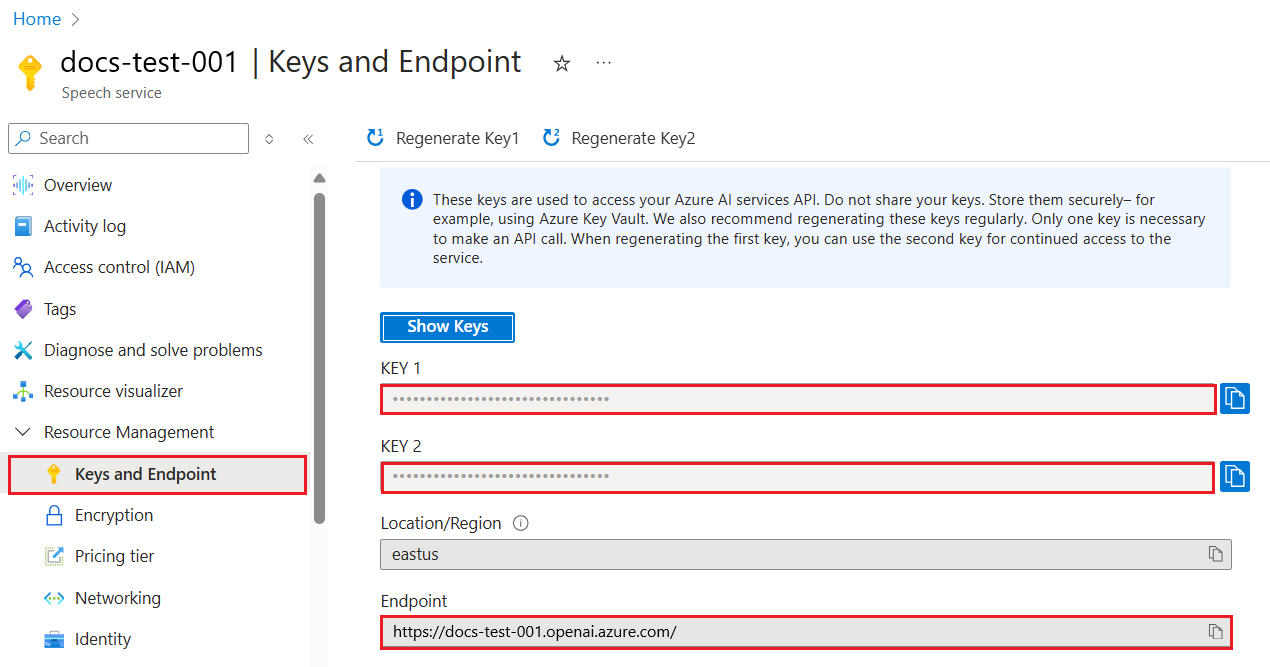
Đã sao chép thông tin này, hãy chỉ cho thư viện dùng nó.
Cấu hình cho Azure
Nếu bạn dùng Azure OpenAI (nay là một phần của Microsoft Foundry), đây là cách cấu hình. Chúng ta dùng client OpenAI chuẩn trỏ tới endpoint /openai/v1/ của Azure OpenAI, chạy được với Responses API và không cần api_version:
import os
from openai import OpenAI

client = OpenAI(
    api_key=os.environ["AZURE_OPENAI_API_KEY"],
    base_url=f"{os.environ['AZURE_OPENAI_ENDPOINT'].rstrip('/')}/openai/v1/",
)
Ở trên, chúng ta đặt:
api_key: API key lấy từ Azure Portal hoặc Microsoft Foundry portal.base_url: endpoint của resource Foundry, thêm/openai/v1/ở cuối. Endpoint v1 ổn định dùng được cho cả OpenAI và Azure OpenAI, không phải quản lýapi_version.
Sinh văn bản
Cách sinh văn bản là dùng Responses API qua phương thức responses.create. Ví dụ:
prompt = "Complete the following: Once upon a time there was a"

response = client.responses.create(
    model="gpt-5-mini",  # this is your model deployment name
    input=prompt,
    store=False,
)
print(response.output_text)
Trong code trên, chúng ta tạo một response, truyền vào model muốn dùng và prompt, rồi in văn bản được sinh ra qua response.output_text.
Hội thoại nhiều lượt
Responses API phù hợp cho cả sinh văn bản một lượt lẫn chatbot nhiều lượt: bạn đưa một danh sách message vào input để dựng cuộc hội thoại:
from openai import OpenAI

client = OpenAI(api_key="sk-...")

response = client.responses.create(model="gpt-5-mini", input="Hello world", store=False)
print(response.output_text)
Chức năng này sẽ được nói kỹ hơn ở bài sau.
Bài thực hành: ứng dụng sinh văn bản đầu tiên
Đã biết cách cài đặt và cấu hình openai, giờ là lúc xây ứng dụng sinh văn bản đầu tiên. Làm theo các bước:
-
Tạo môi trường ảo và cài openai:
bashpython -m venv venv source venv/bin/activate pip install openaiNếu dùng Windows, gõ
venv\Scripts\activatethay chosource venv/bin/activate.Để tìm Azure OpenAI key, vào https://portal.azure.com/, tìm
Open AI, chọnOpen AI resource, rồi chọnKeys and Endpointvà sao chép giá trịKey 1. -
Tạo file app.py với code sau:
pythonimport os from openai import OpenAI client = OpenAI( api_key="<replace this value with your Azure OpenAI key>", base_url="<endpoint found in Azure Portal>/openai/v1/", ) deployment_name = "<deployment name>" # add your completion code prompt = "Complete the following: Once upon a time there was a" # make a request using the Responses API response = client.responses.create(model=deployment_name, input=prompt, store=False) # print response print(response.output_text)Nếu dùng OpenAI thuần (không qua Azure), hãy dùng
client = OpenAI(api_key="<replace this value with your OpenAI key>")(không cóbase_url) và truyền tên model nhưgpt-5-minithay cho tên deployment.Bạn sẽ thấy đầu ra tương tự:
outputvery unhappy _____. Once upon a time there was a very unhappy mermaid.
Mỗi loại prompt cho một việc
Bạn đã thấy cách sinh văn bản bằng prompt, thậm chí đã có một chương trình chạy được để sửa đổi và sinh các loại văn bản khác nhau.
Prompt dùng được cho đủ loại tác vụ. Ví dụ:
- Sinh một loại văn bản. Ví dụ, sinh một bài thơ, câu hỏi cho bài quiz…
- Tra cứu thông tin. Dùng prompt để tìm thông tin, như 'What does CORS mean in web development?'.
- Sinh code. Dùng prompt để sinh code, ví dụ viết biểu thức chính quy kiểm tra email, hay sinh cả một chương trình như ứng dụng web.
Tình huống thực tế hơn: ứng dụng gợi ý công thức nấu ăn
Giả sử bạn có sẵn nguyên liệu ở nhà và muốn nấu món gì đó. Bạn cần công thức. Có thể tìm bằng công cụ tìm kiếm, hoặc dùng LLM.
Bạn có thể viết prompt như sau:
"Show me 5 recipes for a dish with the following ingredients: chicken, potatoes, and carrots. Per recipe, list all the ingredients used"
Với prompt trên, bạn có thể nhận câu trả lời tương tự:
1. Roasted Chicken and Vegetables:
Ingredients:
- 4 chicken thighs
- 2 potatoes, cut into cubes
- 2 carrots, cut into cubes
- 2 tablespoons olive oil
- 2 cloves garlic, minced
- 1 teaspoon dried thyme
- 1 teaspoon dried oregano
- Salt and pepper, to taste

2. Chicken and Potato Stew:
Ingredients:
- 2 tablespoons olive oil
- 1 onion, diced
- 2 cloves garlic, minced
- 2 chicken breasts, cut into cubes
- 2 potatoes, cut into cubes
- 2 carrots, cut into cubes
- 1 teaspoon dried oregano
- 1 teaspoon dried thyme
- 1 cup chicken broth
- Salt and pepper, to taste

3. Chicken and Potato Bake:
Ingredients:
- 2 tablespoons olive oil
- 2 chicken breasts, cut into cubes
- 2 potatoes, cut into cubes
- 2 carrots, cut into cubes
- 1 onion, diced
- 2 cloves garlic, minced
- 1 teaspoon dried oregano
- 1 teaspoon dried thyme
- 1 cup chicken broth
- Salt and pepper, to taste

4. Chicken and Potato Soup:
Ingredients:
- 2 tablespoons olive oil
- 1 onion, diced
- 2 cloves garlic, minced
- 2 chicken breasts, cut into cubes
- 2 potatoes, cut into cubes
- 2 carrots, cut into cubes
- 1 teaspoon dried oregano
- 1 teaspoon dried thyme
- 4 cups chicken broth
- Salt and pepper, to taste

5. Chicken and Potato Hash:
Ingredients:
- 2 tablespoons olive oil
- 2 chicken breasts, cut into cubes
- 2 potatoes, cut into cubes
- 2 carrots, cut into cubes
- 1 onion, diced
- 2 cloves garlic, minced
- 1 teaspoon dried oregano
Kết quả này rất tốt, bạn đã biết nấu gì. Lúc này, vài cải tiến hữu ích có thể là:
- Lọc bỏ nguyên liệu không thích hoặc bị dị ứng.
- Tạo danh sách đi chợ, phòng khi ở nhà không có đủ nguyên liệu.
Với các trường hợp trên, hãy thêm một prompt:
"Please remove recipes with garlic as I'm allergic and replace it with something else. Also, please produce a shopping list for the recipes, considering I already have chicken, potatoes and carrots at home."
Giờ bạn có kết quả mới:
1. Roasted Chicken and Vegetables:
Ingredients:
- 4 chicken thighs
- 2 potatoes, cut into cubes
- 2 carrots, cut into cubes
- 2 tablespoons olive oil
- 1 teaspoon dried thyme
- 1 teaspoon dried oregano
- Salt and pepper, to taste

2. Chicken and Potato Stew:
Ingredients:
- 2 tablespoons olive oil
- 1 onion, diced
- 2 chicken breasts, cut into cubes
- 2 potatoes, cut into cubes
- 2 carrots, cut into cubes
- 1 teaspoon dried oregano
- 1 teaspoon dried thyme
- 1 cup chicken broth
- Salt and pepper, to taste

3. Chicken and Potato Bake:
Ingredients:
- 2 tablespoons olive oil
- 2 chicken breasts, cut into cubes
- 2 potatoes, cut into cubes
- 2 carrots, cut into cubes
- 1 onion, diced
- 1 teaspoon dried oregano
- 1 teaspoon dried thyme
- 1 cup chicken broth
- Salt and pepper, to taste

4. Chicken and Potato Soup:
Ingredients:
- 2 tablespoons olive oil
- 1 onion, diced
- 2 chicken breasts, cut into cubes
- 2 potatoes, cut into cubes
- 2 carrots, cut into cubes
- 1 teaspoon dried oregano
- 1 teaspoon dried thyme
- 4 cups chicken broth
- Salt and pepper, to taste

5. Chicken and Potato Hash:
Ingredients:
- 2 tablespoons olive oil
- 2 chicken breasts, cut into cubes
- 2 potatoes, cut into cubes
- 2 carrots, cut into cubes
- 1 onion, diced
- 1 teaspoon dried oregano

Shopping List:
- Olive oil
- Onion
- Thyme
- Oregano
- Salt
- Pepper
Đó là năm công thức không có tỏi, kèm danh sách đi chợ có tính tới những gì bạn đã có ở nhà.
Bài thực hành: xây ứng dụng gợi ý công thức
Đã thử qua tình huống, giờ hãy viết code tương ứng. Làm theo các bước:
-
Dùng file app.py đã có làm điểm xuất phát.
-
Tìm biến
promptvà đổi code thành:pythonprompt = "Show me 5 recipes for a dish with the following ingredients: chicken, potatoes, and carrots. Per recipe, list all the ingredients used"Chạy code, bạn sẽ thấy đầu ra tương tự:
output-Chicken Stew with Potatoes and Carrots: 3 tablespoons oil, 1 onion, chopped, 2 cloves garlic, minced, 1 carrot, peeled and chopped, 1 potato, peeled and chopped, 1 bay leaf, 1 thyme sprig, 1/2 teaspoon salt, 1/4 teaspoon black pepper, 1 1/2 cups chicken broth, 1/2 cup dry white wine, 2 tablespoons chopped fresh parsley, 2 tablespoons unsalted butter, 1 1/2 pounds boneless, skinless chicken thighs, cut into 1-inch pieces -Oven-Roasted Chicken with Potatoes and Carrots: 3 tablespoons extra-virgin olive oil, 1 tablespoon Dijon mustard, 1 tablespoon chopped fresh rosemary, 1 tablespoon chopped fresh thyme, 4 cloves garlic, minced, 1 1/2 pounds small red potatoes, quartered, 1 1/2 pounds carrots, quartered lengthwise, 1/2 teaspoon salt, 1/4 teaspoon black pepper, 1 (4-pound) whole chicken -Chicken, Potato, and Carrot Casserole: cooking spray, 1 large onion, chopped, 2 cloves garlic, minced, 1 carrot, peeled and shredded, 1 potato, peeled and shredded, 1/2 teaspoon dried thyme leaves, 1/4 teaspoon salt, 1/4 teaspoon black pepper, 2 cups fat-free, low-sodium chicken broth, 1 cup frozen peas, 1/4 cup all-purpose flour, 1 cup 2% reduced-fat milk, 1/4 cup grated Parmesan cheese -One Pot Chicken and Potato Dinner: 2 tablespoons olive oil, 1 pound boneless, skinless chicken thighs, cut into 1-inch pieces, 1 large onion, chopped, 3 cloves garlic, minced, 1 carrot, peeled and chopped, 1 potato, peeled and chopped, 1 bay leaf, 1 thyme sprig, 1/2 teaspoon salt, 1/4 teaspoon black pepper, 2 cups chicken broth, 1/2 cup dry white wine -Chicken, Potato, and Carrot Curry: 1 tablespoon vegetable oil, 1 large onion, chopped, 2 cloves garlic, minced, 1 carrot, peeled and chopped, 1 potato, peeled and chopped, 1 teaspoon ground coriander, 1 teaspoon ground cumin, 1/2 teaspoon ground turmeric, 1/2 teaspoon ground ginger, 1/4 teaspoon cayenne pepper, 2 cups chicken broth, 1/2 cup dry white wine, 1 (15-ounce) can chickpeas, drained and rinsed, 1/2 cup raisins, 1/2 cup chopped fresh cilantroLưu ý: LLM không tất định, nên mỗi lần chạy chương trình bạn có thể nhận kết quả khác.
Tốt lắm, giờ hãy cải thiện. Chúng ta muốn code linh hoạt để có thể thay đổi nguyên liệu và số công thức.
-
Sửa code như sau:
pythonno_recipes = input("No of recipes (for example, 5): ") ingredients = input("List of ingredients (for example, chicken, potatoes, and carrots): ") # interpolate the number of recipes into the prompt an ingredients prompt = f"Show me {no_recipes} recipes for a dish with the following ingredients: {ingredients}. Per recipe, list all the ingredients used"Chạy thử code có thể trông như sau:
outputNo of recipes (for example, 5): 3 List of ingredients (for example, chicken, potatoes, and carrots): milk,strawberries -Strawberry milk shake: milk, strawberries, sugar, vanilla extract, ice cubes -Strawberry shortcake: milk, flour, baking powder, sugar, salt, unsalted butter, strawberries, whipped cream -Strawberry milk: milk, strawberries, sugar, vanilla extract
Cải thiện: thêm bộ lọc và danh sách đi chợ
Giờ ta đã có ứng dụng chạy được, tạo ra công thức và linh hoạt nhờ dựa vào đầu vào của người dùng, cả số công thức lẫn nguyên liệu.
Để cải thiện thêm, chúng ta muốn bổ sung:
-
Lọc nguyên liệu. Muốn lọc bỏ nguyên liệu không thích hoặc bị dị ứng. Để làm vậy, sửa prompt hiện có và thêm điều kiện lọc vào cuối:
pythonfilter = input("Filter (for example, vegetarian, vegan, or gluten-free): ") prompt = f"Show me {no_recipes} recipes for a dish with the following ingredients: {ingredients}. Per recipe, list all the ingredients used, no {filter}"Ở trên, ta thêm
{filter}vào cuối prompt và lấy giá trị bộ lọc từ người dùng.Một lần chạy chương trình giờ có thể trông như sau:
outputNo of recipes (for example, 5): 3 List of ingredients (for example, chicken, potatoes, and carrots): onion,milk Filter (for example, vegetarian, vegan, or gluten-free): no milk 1. French Onion Soup Ingredients: -1 large onion, sliced -3 cups beef broth -1 cup milk -6 slices french bread -1/4 cup shredded Parmesan cheese -1 tablespoon butter -1 teaspoon dried thyme -1/4 teaspoon salt -1/4 teaspoon black pepper Instructions: 1. In a large pot, sauté onions in butter until golden brown. 2. Add beef broth, milk, thyme, salt, and pepper. Bring to a boil. 3. Reduce heat and simmer for 10 minutes. 4. Place french bread slices on soup bowls. 5. Ladle soup over bread. 6. Sprinkle with Parmesan cheese. 2. Onion and Potato Soup Ingredients: -1 large onion, chopped -2 cups potatoes, diced -3 cups vegetable broth -1 cup milk -1/4 teaspoon black pepper Instructions: 1. In a large pot, sauté onions in butter until golden brown. 2. Add potatoes, vegetable broth, milk, and pepper. Bring to a boil. 3. Reduce heat and simmer for 10 minutes. 4. Serve hot. 3. Creamy Onion Soup Ingredients: -1 large onion, chopped -3 cups vegetable broth -1 cup milk -1/4 teaspoon black pepper -1/4 cup all-purpose flour -1/2 cup shredded Parmesan cheese Instructions: 1. In a large pot, sauté onions in butter until golden brown. 2. Add vegetable broth, milk, and pepper. Bring to a boil. 3. Reduce heat and simmer for 10 minutes. 4. In a small bowl, whisk together flour and Parmesan cheese until smooth. 5. Add to soup and simmer for an additional 5 minutes, or until soup has thickened.Bài gốc nhận xét rằng các công thức có sữa đã bị lọc bỏ. Nhưng nếu bạn không dung nạp lactose, có thể bạn cũng muốn lọc cả công thức có phô mai, nên cần nói rõ ràng.
-
Tạo danh sách đi chợ. Muốn tạo danh sách đi chợ, có tính tới những gì đã có ở nhà.
Với chức năng này, ta có thể giải quyết tất cả trong một prompt, hoặc chia thành hai prompt. Hãy thử cách thứ hai: thêm một prompt nữa, nhưng để nó hoạt động, cần đưa kết quả của prompt trước làm ngữ cảnh cho prompt sau.
Tìm đoạn code in kết quả của prompt đầu tiên và thêm code sau bên dưới:
pythonold_prompt_result = response.output_text prompt = "Produce a shopping list for the generated recipes and please don't include ingredients that I already have." new_prompt = f"{old_prompt_result} {prompt}" response = client.responses.create(model=deployment_name, input=new_prompt, max_output_tokens=1200, store=False) # print response print("Shopping list:") print(response.output_text)Lưu ý:
-
Chúng ta dựng prompt mới bằng cách ghép kết quả của prompt đầu tiên vào prompt mới:
pythonnew_prompt = f"{old_prompt_result} {prompt}" -
Chúng ta gửi một yêu cầu mới, có tính tới số token đã yêu cầu ở prompt đầu, nên lần này đặt
max_output_tokenslà 1200.pythonresponse = client.responses.create(model=deployment_name, input=new_prompt, max_output_tokens=1200, store=False)Chạy thử code này, ta nhận được đầu ra:
outputNo of recipes (for example, 5): 2 List of ingredients (for example, chicken, potatoes, and carrots): apple,flour Filter (for example, vegetarian, vegan, or gluten-free): sugar -Apple and flour pancakes: 1 cup flour, 1/2 tsp baking powder, 1/2 tsp baking soda, 1/4 tsp salt, 1 tbsp sugar, 1 egg, 1 cup buttermilk or sour milk, 1/4 cup melted butter, 1 Granny Smith apple, peeled and grated -Apple fritters: 1-1/2 cups flour, 1 tsp baking powder, 1/4 tsp salt, 1/4 tsp baking soda, 1/4 tsp nutmeg, 1/4 tsp cinnamon, 1/4 tsp allspice, 1/4 cup sugar, 1/4 cup vegetable shortening, 1/4 cup milk, 1 egg, 2 cups shredded, peeled apples Shopping list: -Flour, baking powder, baking soda, salt, sugar, egg, buttermilk, butter, apple, nutmeg, cinnamon, allspice
-
Cải thiện cách thiết lập
Code hiện tại đã chạy được, nhưng còn vài điều chỉnh nên làm:
-
Tách secret khỏi code, như API key. Secret không thuộc về code và nên được lưu ở nơi an toàn. Để tách, ta dùng biến môi trường và thư viện như
python-dotenvđể nạp chúng từ file:-
Tạo file
.envvới nội dung:bashOPENAI_API_KEY=sk-...Với Azure OpenAI trong Microsoft Foundry, bạn cần đặt các biến môi trường sau:
bashAZURE_OPENAI_API_KEY=<replace> AZURE_OPENAI_ENDPOINT=<replace> AZURE_OPENAI_API_VERSION=2024-10-21Trong code, nạp biến môi trường như sau:
pythonimport os from dotenv import load_dotenv from openai import OpenAI load_dotenv() client = OpenAI(api_key=os.environ["OPENAI_API_KEY"])
-
-
Về độ dài token. Hãy cân nhắc cần bao nhiêu token để sinh văn bản mong muốn. Token tốn tiền, nên khi có thể, hãy tiết kiệm số token. Ví dụ, có thể diễn đạt prompt để dùng ít token hơn không?
Để thay đổi số token, dùng tham số
max_output_tokens. Ví dụ, muốn dùng 100 token:pythonresponse = client.responses.create(model=deployment, input=prompt, max_output_tokens=100, store=False) -
Thử nghiệm với temperature. Temperature ảnh hưởng quan trọng tới cách chương trình hoạt động. Temperature càng cao, đầu ra càng ngẫu nhiên; càng thấp, đầu ra càng dễ đoán. Hãy cân nhắc bạn có muốn đầu ra đa dạng hay không.
Để thay đổi temperature, dùng tham số
temperature. Ví dụ, muốn temperature 0.5:pythonresponse = client.responses.create(model=deployment, input=prompt, temperature=0.5, store=False)Càng gần 1.0, đầu ra càng đa dạng.
-
Model suy luận (reasoning model) không dùng
temperature. Đây là thay đổi quan trọng năm 2026. Các model hiện hành, chưa bị ngừng hỗ trợ trên Microsoft Foundry là model suy luận (họ GPT-5, o-series), và chúng không hỗ trợtemperaturehaytop_p(cũng không hỗ trợmax_tokens; hãy dùngmax_output_tokens). Nếu gửitemperaturetớigpt-5-mini, bạn sẽ nhận lỗi "parameter not supported". Vì vậy, để thử ví dụ temperature ở trên, hãy dùng một model vẫn hỗ trợ điều khiển sampling, ví dụ model Llama mở nhưLlama-3.3-70B-Instructtrong danh mục model của Microsoft Foundry, gọi qua endpoint Foundry Models / Azure AI Inference (giống các mẫugithubmodels-*). Với model suy luận như GPT-5, bạn điều khiển đầu ra theo cách khác:- Prompt engineering: chỉ dẫn rõ ràng, ví dụ và đầu ra có cấu trúc (xem bài Nền tảng prompt engineering) làm thay việc của các "núm vặn" sampling trước đây.
- Điều khiển suy luận: các tham số như reasoning effort/verbosity đánh đổi độ sâu suy luận với độ trễ và chi phí.
Tóm lại:
temperature/top_pvẫn dùng được trên nhiều model (Llama, Mistral, Phi và họ GPT-4.x, dù GPT-4.x đang bị ngừng dần), nhưng xu hướng là prompt engineering kết hợp điều khiển suy luận trên các model suy luận như GPT-5.
Bài tập
Bạn tự chọn thứ muốn xây. Vài gợi ý:
- Chỉnh ứng dụng gợi ý công thức để cải thiện thêm. Thử các giá trị temperature và prompt khác nhau xem được gì.
- Xây một "bạn học" (study buddy). Ứng dụng trả lời câu hỏi về một chủ đề, ví dụ Python, với prompt như "What is a certain topic in Python?", hoặc yêu cầu hiển thị code cho một chủ đề.
- Bot lịch sử: làm lịch sử sống động, yêu cầu bot đóng vai một nhân vật lịch sử và hỏi về cuộc đời, thời đại của nhân vật đó.
Gợi ý lời giải: bạn học
Đây là prompt khởi đầu, hãy dùng và chỉnh theo ý bạn:
- "You're an expert on the Python language

    Suggest a beginner lesson for Python in the following format:

    Format:
    - concepts:
    - brief explanation of the lesson:
    - exercise in code with solutions"
Gợi ý lời giải: bot lịch sử
Một số prompt bạn có thể dùng:
- "You are Abe Lincoln, tell me about yourself in 3 sentences, and respond using grammar and words like Abe would have used"
- "You are Abe Lincoln, respond using grammar and words like Abe would have used:

   Tell me about your greatest accomplishments, in 300 words"
Thử thách
Khi làm bài tập, hãy thử thay đổi temperature: đặt 0, 0.5 và 1. Nhớ rằng 0 là ít đa dạng nhất và 1 là nhiều nhất. Giá trị nào hợp nhất với ứng dụng của bạn?
Bài tiếp theo: Xây ứng dụng chat.
Nguồn
- Dịch và biên tập từ microsoft/generative-ai-for-beginners · 06-text-generation-apps/README.md, giấy phép MIT.