Bài này giải quyết hai vấn đề còn lại từ các bài trước: làm sao có định dạng câu trả lời nhất quán để dễ xử lý ở các bước sau, và làm sao đưa dữ liệu từ nguồn khác vào để làm giàu ứng dụng. Công cụ chính là function calling.
Video bài học (tiếng Anh): xem trên YouTube.
Giới thiệu
Bài này gồm:
- Giải thích function calling là gì và các tình huống sử dụng.
- Tạo một function call bằng Azure OpenAI.
- Cách tích hợp function call vào ứng dụng.
Mục tiêu học tập
Sau bài này, bạn sẽ có thể:
- Giải thích mục đích của function calling.
- Thiết lập function call bằng Azure OpenAI Service.
- Thiết kế function call hiệu quả cho tình huống của ứng dụng.
Tình huống: cải thiện chatbot bằng function
Trong bài này, chúng ta muốn xây cho startup giáo dục một tính năng cho phép người dùng dùng chatbot để tìm khoá học kỹ thuật. Chúng ta sẽ gợi ý khoá học phù hợp với trình độ, vai trò hiện tại và công nghệ họ quan tâm.
Để làm tình huống này, chúng ta kết hợp:
Azure OpenAIđể tạo trải nghiệm chat cho người dùng.Microsoft Learn Catalog APIđể giúp người dùng tìm khoá học theo yêu cầu.Function Callingđể lấy truy vấn của người dùng và gửi tới một function thực hiện request API.
Trước hết, hãy xem vì sao lại cần function calling.
Vì sao cần function calling
Trước khi có function calling, câu trả lời của LLM không có cấu trúc và không nhất quán. Lập trình viên phải viết code kiểm tra phức tạp để xử lý mọi biến thể của câu trả lời. Người dùng cũng không nhận được câu trả lời cho những câu như "What is the current weather in Stockholm?", vì model bị giới hạn ở thời điểm dữ liệu huấn luyện.
Function calling là tính năng của Azure OpenAI Service để vượt qua các giới hạn sau:
- Định dạng câu trả lời nhất quán. Kiểm soát tốt hơn định dạng câu trả lời giúp tích hợp câu trả lời vào các hệ thống phía sau dễ hơn.
- Dữ liệu ngoài. Dùng được dữ liệu từ các nguồn khác của ứng dụng trong ngữ cảnh chat.
Minh hoạ vấn đề qua một tình huống
Bài gốc khuyên dùng notebook kèm theo nếu bạn muốn chạy tình huống dưới đây. Bạn cũng có thể chỉ đọc, vì mục đích là minh hoạ một vấn đề mà function giúp giải quyết.
Hãy xem ví dụ minh hoạ vấn đề định dạng câu trả lời. Giả sử chúng ta muốn tạo cơ sở dữ liệu học sinh để gợi ý khoá học phù hợp. Dưới đây là hai mô tả học sinh có dữ liệu rất giống nhau.
-
Tạo kết nối tới resource Azure OpenAI:
pythonimport os import json from openai import OpenAI from dotenv import load_dotenv load_dotenv() # The Responses API is served from the Azure OpenAI (Microsoft Foundry) v1 # endpoint, so we point the OpenAI client at <your-endpoint>/openai/v1/. endpoint = os.environ['AZURE_OPENAI_ENDPOINT'] client = OpenAI( api_key=os.environ['AZURE_OPENAI_API_KEY'], base_url=f"{endpoint.rstrip('/')}/openai/v1/", ) deployment=os.environ['AZURE_OPENAI_DEPLOYMENT']Đây là code Python cấu hình kết nối tới Azure OpenAI. Vì dùng endpoint v1, chúng ta chỉ cần đặt
api_keyvàbase_url(không cầnapi_version). -
Tạo hai mô tả học sinh bằng các biến
student_1_descriptionvàstudent_2_description:pythonstudent_1_description="Emily Johnson is a sophomore majoring in computer science at Duke University. She has a 3.7 GPA. Emily is an active member of the university's Chess Club and Debate Team. She hopes to pursue a career in software engineering after graduating." student_2_description = "Michael Lee is a sophomore majoring in computer science at Stanford University. He has a 3.8 GPA. Michael is known for his programming skills and is an active member of the university's Robotics Club. He hopes to pursue a career in artificial intelligence after finishing his studies."Chúng ta muốn gửi hai mô tả trên tới LLM để phân tích dữ liệu. Dữ liệu này sau đó có thể dùng trong ứng dụng, gửi tới một API hoặc lưu vào cơ sở dữ liệu.
-
Tạo hai prompt giống hệt nhau, chỉ dẫn LLM về thông tin chúng ta cần:
pythonprompt1 = f''' Please extract the following information from the given text and return it as a JSON object: name major school grades club This is the body of text to extract the information from: {student_1_description} ''' prompt2 = f''' Please extract the following information from the given text and return it as a JSON object: name major school grades club This is the body of text to extract the information from: {student_2_description} '''Các prompt trên yêu cầu LLM trích xuất thông tin và trả về định dạng JSON.
-
Sau khi có prompt và kết nối tới Azure OpenAI, chúng ta gửi prompt tới LLM bằng
client.responses.create. Prompt được đặt trong biếninputvới vai tròuser, mô phỏng một tin nhắn người dùng gửi tới chatbot.python# response from prompt one openai_response1 = client.responses.create( model=deployment, input = [{'role': 'user', 'content': prompt1}], store=False, ) openai_response1.output_text # response from prompt two openai_response2 = client.responses.create( model=deployment, input = [{'role': 'user', 'content': prompt2}], store=False, ) openai_response2.output_textGiờ ta gửi cả hai yêu cầu tới LLM và xem câu trả lời qua
openai_response1.output_text. -
Cuối cùng, chuyển câu trả lời sang JSON bằng
json.loads:python# Loading the response as a JSON object json_response1 = json.loads(openai_response1.output_text) json_response1Câu trả lời 1:
json{ "name": "Emily Johnson", "major": "computer science", "school": "Duke University", "grades": "3.7", "club": "Chess Club" }Câu trả lời 2:
json{ "name": "Michael Lee", "major": "computer science", "school": "Stanford University", "grades": "3.8 GPA", "club": "Robotics Club" }Dù prompt giống nhau và mô tả tương tự, giá trị của thuộc tính
Gradeslại có định dạng khác nhau: lúc là3.7, lúc là3.7 GPA.Lý do là LLM nhận dữ liệu phi cấu trúc dưới dạng prompt viết tay và cũng trả về dữ liệu phi cấu trúc. Chúng ta cần một định dạng có cấu trúc để biết trước sẽ nhận được gì khi lưu hoặc dùng dữ liệu.
Vậy giải quyết vấn đề định dạng thế nào? Dùng function calling, ta đảm bảo nhận lại dữ liệu có cấu trúc. Khi dùng function calling, LLM không thực sự gọi hay chạy function nào. Thay vào đó, chúng ta tạo một cấu trúc để LLM tuân theo khi trả lời, rồi dùng các câu trả lời có cấu trúc đó để biết cần chạy function nào trong ứng dụng.
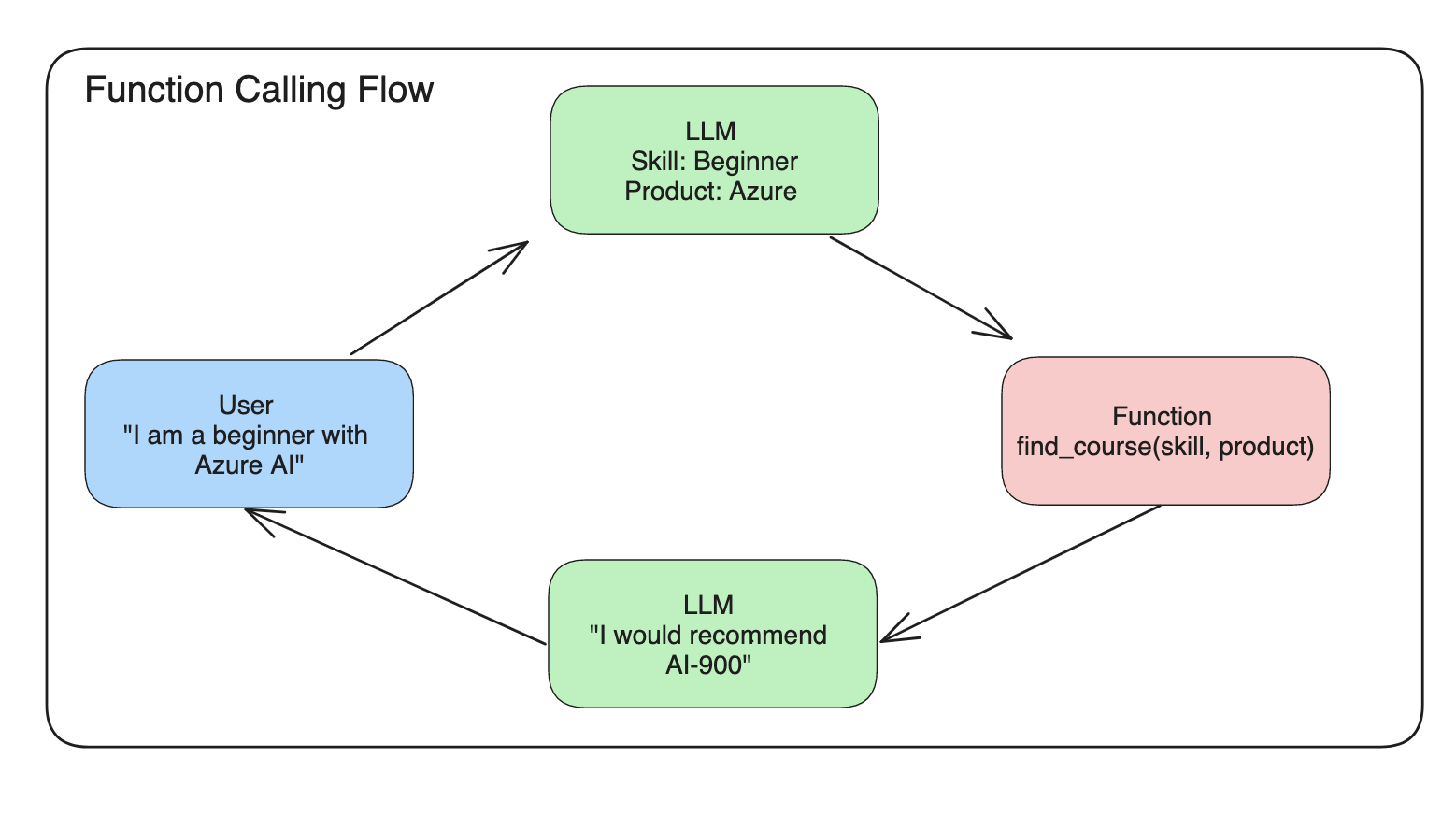
Sau đó ta lấy kết quả function trả về và gửi lại cho LLM. LLM sẽ trả lời bằng ngôn ngữ tự nhiên cho câu hỏi của người dùng.
Các tình huống dùng function call
Có nhiều tình huống function call giúp cải thiện ứng dụng, như:
- Gọi tool bên ngoài. Chatbot rất giỏi trả lời câu hỏi. Với function calling, chatbot có thể dùng tin nhắn của người dùng để hoàn thành tác vụ. Ví dụ, học sinh có thể nhờ chatbot "Send an email to my instructor saying I need more assistance with this subject" (gửi email cho giảng viên nói em cần thêm hỗ trợ môn này). Việc này có thể gọi function
send_email(to: string, body: string). - Tạo truy vấn API hoặc cơ sở dữ liệu. Người dùng tìm thông tin bằng ngôn ngữ tự nhiên, được chuyển thành truy vấn hoặc request API có định dạng. Ví dụ, giáo viên hỏi "Who are the students that completed the last assignment" (học sinh nào đã nộp bài tập vừa rồi), có thể gọi function
get_completed(student_name: string, assignment: int, current_status: string). - Tạo dữ liệu có cấu trúc. Người dùng lấy một đoạn văn bản hoặc CSV và dùng LLM trích thông tin quan trọng. Ví dụ, học sinh chuyển một bài Wikipedia về các hiệp định hoà bình thành flashcard AI, bằng function
get_important_facts(agreement_name: string, date_signed: string, parties_involved: list).
Tạo function call đầu tiên
Quy trình tạo function call gồm 3 bước chính:
- Gọi Responses API với danh sách function (tool) và một tin nhắn của người dùng.
- Đọc câu trả lời của model để thực hiện hành động, tức chạy một function hoặc gọi API.
- Gọi Responses API lần nữa với kết quả từ function, để dùng thông tin đó tạo câu trả lời cho người dùng.
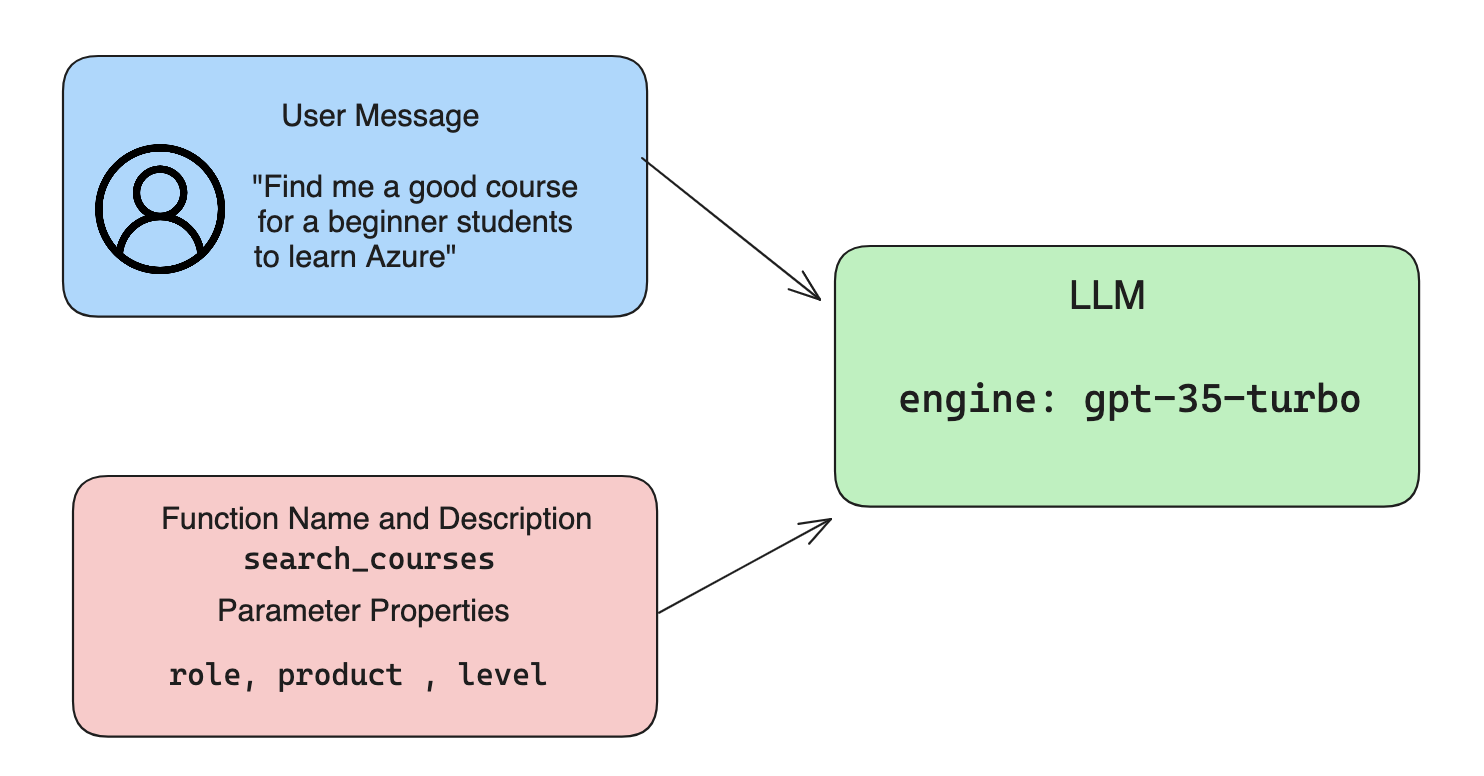
Bước 1: tạo message
Bước đầu là tạo tin nhắn của người dùng. Có thể gán động từ giá trị của một ô nhập, hoặc gán sẵn ở đây. Nếu lần đầu làm việc với Responses API, bạn cần định nghĩa role và content của message.
role có thể là system (đặt luật), assistant (model) hoặc user (người dùng cuối). Với function calling, ta gán là user kèm một câu hỏi ví dụ.
messages= [ {"role": "user", "content": "Find me a good course for a beginner student to learn Azure."} ]
Gán các vai trò khác nhau giúp LLM biết rõ ai đang nói, hệ thống hay người dùng, từ đó xây lịch sử hội thoại để LLM dựa vào.
Bước 2: tạo function
Tiếp theo, ta định nghĩa một function và tham số của nó. Ở đây chỉ dùng một function search_courses, nhưng bạn có thể tạo nhiều function.
Dưới đây, ta tạo các function dưới dạng mảng. Mỗi phần tử là một tool theo định dạng phẳng của Responses API, với các thuộc tính type, name, description và parameters:
functions = [
   {
      "type":"function",
      "name":"search_courses",
      "description":"Retrieves courses from the search index based on the parameters provided",
      "parameters":{
         "type":"object",
         "properties":{
            "role":{
               "type":"string",
               "description":"The role of the learner (i.e. developer, data scientist, student, etc.)"
            },
            "product":{
               "type":"string",
               "description":"The product that the lesson is covering (i.e. Azure, Power BI, etc.)"
            },
            "level":{
               "type":"string",
               "description":"The level of experience the learner has prior to taking the course (i.e. beginner, intermediate, advanced)"
            }
         },
         "required":[
            "role"
         ]
      }
   }
]
Chi tiết từng thuộc tính:
name: tên function muốn được gọi.description: mô tả cách function hoạt động. Ở đây cần cụ thể và rõ ràng.parameters: danh sách giá trị và định dạng bạn muốn model tạo ra trong câu trả lời. Gồm các thuộc tính:type: kiểu dữ liệu mà các thuộc tính sẽ được lưu.properties: danh sách các giá trị cụ thể model dùng trong câu trả lời.name: khoá là tên thuộc tính model dùng trong câu trả lời có định dạng, ví dụproduct.type: kiểu dữ liệu của thuộc tính, ví dụstring.description: mô tả thuộc tính đó.
Ngoài ra còn thuộc tính tuỳ chọn required: các thuộc tính bắt buộc để hoàn thành function call.
Bước 3: thực hiện function call
Sau khi định nghĩa function, ta cần đưa nó vào lời gọi Responses API bằng cách thêm tools vào request, ở đây là tools=functions.
Còn có tuỳ chọn đặt tool_choice là auto, nghĩa là để LLM tự quyết function nào cần gọi dựa trên tin nhắn người dùng, thay vì ta tự chỉ định.
Dưới đây là code gọi client.responses.create; để ý ta đặt tools=functions và tool_choice="auto", để LLM chọn khi nào gọi các function được cung cấp:
response = client.responses.create(model=deployment,
                                        input=messages,
                                        tools=functions,
                                        tool_choice="auto",
                                        store=False)

print(response.output)
Câu trả lời giờ có một phần tử function_call trong response.output như sau:
{
  "type": "function_call",
  "name": "search_courses",
  "call_id": "call_abc123",
  "arguments": "{\n  \"role\": \"student\",\n  \"product\": \"Azure\",\n  \"level\": \"beginner\"\n}"
}
Ở đây ta thấy function search_courses được gọi với các đối số nào, liệt kê trong thuộc tính arguments của JSON.
LLM tìm được dữ liệu khớp với đối số của function bằng cách trích từ giá trị truyền vào tham số input của lời gọi Responses API. Nhắc lại giá trị của messages:
messages= [ {"role": "user", "content": "Find me a good course for a beginner student to learn Azure."} ]
Như bạn thấy, student, Azure và beginner được trích từ messages và làm đầu vào cho function. Dùng function theo cách này là cách tuyệt vời để trích thông tin từ prompt, đồng thời cung cấp cấu trúc cho LLM và có chức năng dùng lại được.
Tiếp theo, hãy xem cách dùng điều này trong ứng dụng.
Tích hợp function call vào ứng dụng
Sau khi đã thử câu trả lời có định dạng từ LLM, giờ ta tích hợp nó vào ứng dụng.
Quản lý luồng xử lý
Để tích hợp, làm theo các bước:
-
Gọi dịch vụ OpenAI và lấy các phần tử function call từ
outputcủa câu trả lời:pythonresponse_items = response.output tool_calls = [item for item in response_items if item.type == "function_call"] -
Định nghĩa function gọi Microsoft Learn API để lấy danh sách khoá học:
pythonimport requests def search_courses(role, product, level): url = "https://learn.microsoft.com/api/catalog/" params = { "role": role, "product": product, "level": level } response = requests.get(url, params=params) modules = response.json()["modules"] results = [] for module in modules[:5]: title = module["title"] url = module["url"] results.append({"title": title, "url": url}) return str(results)Để ý rằng giờ ta tạo một function Python thật, tương ứng với tên function đã khai báo trong biến
functions. Ta cũng gọi API bên ngoài thật để lấy dữ liệu cần thiết, ở đây là Microsoft Learn API để tìm các module đào tạo.Vậy ta đã có biến
functionsvà một function Python tương ứng; làm sao cho LLM biết ánh xạ hai thứ này để function Python được gọi? -
Để biết có cần gọi function Python không, ta xem câu trả lời của LLM có phần tử
function_callkhông, rồi gọi function được chỉ ra. Cách kiểm tra như sau:python# Check if the model wants to call a function if tool_calls: for tool_call in tool_calls: print("Recommended Function call:") print(tool_call.name) print() # Call the function. function_name = tool_call.name available_functions = { "search_courses": search_courses, } function_to_call = available_functions[function_name] function_args = json.loads(tool_call.arguments) function_response = function_to_call(**function_args) print("Output of function call:") print(function_response) print(type(function_response)) # Add the function call and its result back to the conversation. # The model's function_call item must be appended before its output. messages.append(tool_call) # the assistant's function_call item messages.append( # the function result { "type": "function_call_output", "call_id": tool_call.call_id, "output": function_response, } )Ba dòng sau đảm bảo ta lấy tên function, đối số và thực hiện lời gọi:
pythonfunction_to_call = available_functions[function_name] function_args = json.loads(tool_call.arguments) function_response = function_to_call(**function_args)Đây là đầu ra khi chạy code:
textRecommended Function call: { "name": "search_courses", "arguments": "{\n \"role\": \"student\",\n \"product\": \"Azure\",\n \"level\": \"beginner\"\n}" } Output of function call: [{'title': 'Describe concepts of cryptography', 'url': 'https://learn.microsoft.com/training/modules/describe-concepts-of-cryptography/? WT.mc_id=api_CatalogApi'}, {'title': 'Introduction to audio classification with TensorFlow', 'url': 'https://learn.microsoft.com/en- us/training/modules/intro-audio-classification-tensorflow/?WT.mc_id=api_CatalogApi'}, {'title': 'Design a Performant Data Model in Azure SQL Database with Azure Data Studio', 'url': 'https://learn.microsoft.com/training/modules/design-a-data-model-with-ads/? WT.mc_id=api_CatalogApi'}, {'title': 'Getting started with the Microsoft Cloud Adoption Framework for Azure', 'url': 'https://learn.microsoft.com/training/modules/cloud-adoption-framework-getting-started/?WT.mc_id=api_CatalogApi'}, {'title': 'Set up the Rust development environment', 'url': 'https://learn.microsoft.com/training/modules/rust-set-up-environment/?WT.mc_id=api_CatalogApi'}] <class 'str'> -
Giờ gửi
messagesđã cập nhật tới LLM để nhận câu trả lời bằng ngôn ngữ tự nhiên thay vì JSON của API:pythonprint("Messages in next request:") print(messages) print() second_response = client.responses.create( input=messages, model=deployment, tool_choice="auto", tools=functions, temperature=0, store=False, ) # get a new response from the model where it can see the function response print(second_response.output_text)Đầu ra:
textI found some good courses for beginner students to learn Azure: 1. [Describe concepts of cryptography](https://learn.microsoft.com/training/modules/describe-concepts-of-cryptography/?WT.mc_id=api_CatalogApi) 2. [Introduction to audio classification with TensorFlow](https://learn.microsoft.com/training/modules/intro-audio-classification-tensorflow/?WT.mc_id=api_CatalogApi) 3. [Design a Performant Data Model in Azure SQL Database with Azure Data Studio](https://learn.microsoft.com/training/modules/design-a-data-model-with-ads/?WT.mc_id=api_CatalogApi) 4. [Getting started with the Microsoft Cloud Adoption Framework for Azure](https://learn.microsoft.com/training/modules/cloud-adoption-framework-getting-started/?WT.mc_id=api_CatalogApi) 5. [Set up the Rust development environment](https://learn.microsoft.com/training/modules/rust-set-up-environment/?WT.mc_id=api_CatalogApi) You can click on the links to access the courses.
Bài tập
Để tiếp tục học function calling với Azure OpenAI, bạn có thể:
- Thêm tham số cho function để giúp người học tìm được nhiều khoá học hơn.
- Tạo một function call khác lấy thêm thông tin từ người học, như ngôn ngữ mẹ đẻ.
- Xử lý lỗi khi function call và/hoặc lời gọi API không trả về khoá học phù hợp.
Gợi ý: xem trang tài liệu tham chiếu Learn API để biết dữ liệu này có ở đâu và lấy thế nào.
Bài tiếp theo: Bảo mật ứng dụng AI.
Nguồn
- Dịch và biên tập từ microsoft/generative-ai-for-beginners · 11-integrating-with-function-calling/README.md, giấy phép MIT.